

Microsoft has released an update for its Prism emulator to boost performance and increase the number of apps that can be run under emulation on Windows on Arm devices, including those powered by the Snapdragon X series processors.
For those unaware of the Prism emulator, it converts x86 instructions to Arm64 code. With the latest update, it now supports the translation of additional instruction set architecture extensions, including AVX and AVX2. It also supports other related extensions, including BMI, FMA, and F16C. Microsoft said that these extensions are especially relied on by creative tools and games that depend on the efficient parallel processing that these CPU instructions provide.
With the new Prism update, apps such as Ableton Live 12, which couldn’t be installed before due to missing system requirements (AVX support in this case), will be able to run on Windows on Arm systems. The Redmond giant said that Ableton Live will also be coming to Windows on Arm as a native app next year, but in the meantime, it will work on the emulator.
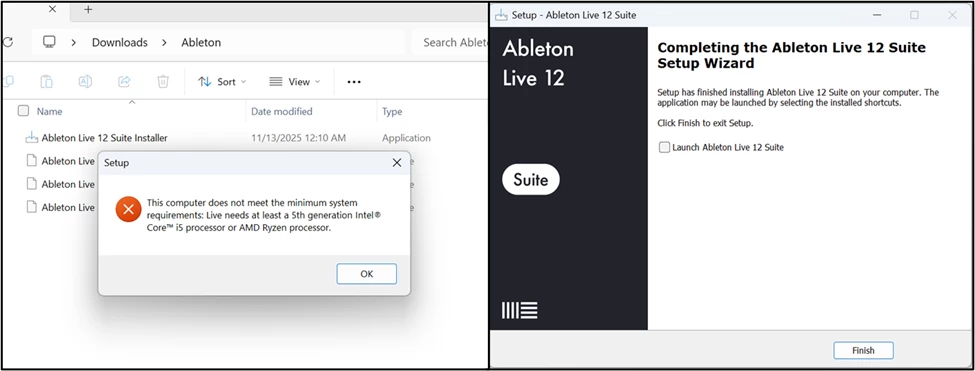
This update to Prism has been rolled out to all Windows on Arm devices running Windows 11, version 24H2 or later. The updated CPU feature support is enabled by default for 64-bit x86 apps, but with 32-bit apps, support is off by default. You can turn on 32-bit app support via the compatibility settings.
Microsoft said that it is committed to enhancing Prism emulation on Windows and that it’s excited about the apps and games today’s update enables. We should expect future updates like this to continue adding support for more apps, and hopefully, 32-bit app support gets enabled by default too.
If you need to enable 32-bit support now, you can check out this documentation page to adjust your settings to allow these apps to run.