


Back in early February 2023, Microsoft started moving towards WinUI on Windows 11 over from DirectUI. For those not familiar, WinUI is the native UI platform component of Windows App SDK (used to build Windows 11 apps), and like WPF, it is also based on XAML.
If you have been reading Neowin recently, you may have recently come across the news of major XAML-related UI issues on certain Windows 11 office PCs wherein the entire Shell (comprising Start menu, Explorer, Taskbar, and more) breaks. This week, Microsoft released more details about the problems.
It is not just enterprise PCs, home users are also still affected by UI and UX bugs even four years after the release of Windows 11. Recently the company confirmed that the latest KB5070311 update can cause flashbang-like artifacts on the File Explorer in dark mode.
Hence it kind of explains why users and enthusiasts are often on the lookout for third-party apps like FluentFlyout, for example, that often do a better job than what Microsoft officially offers.
Speaking of third-party apps, the flashbang-like File Explorer artifacts on Windows 11 can be fixed with a simple tweak that essentially stops WinUI, thus fixing the issue. The workaround was uncovered by X user and tech enthusiast Bob Pony, who also noticed that the File Explorer was now naturally loading up faster without WinUI. The user also says that they noticed a much lower memory footprint on the non-WinUI File Explorer side, and this makes sense too considering the faster improved loading times.
When disabling the WinUI based elements of File Explorer in Windows 11, not only it fixes the flash bang introduced in the recent preview update and makes File Explorer open faster, it also reduces its memory usage by 69%! pic.twitter.com/FkXqDuj8Ta
— BobPony.com (@TheBobPony) December 4, 2025
Users can use a third-party app like ExplorerPatcher to deselect the Windows 11 Command Bar and choose either the Windows 10 Ribbon or the Windows 7 Command Bar option instead.
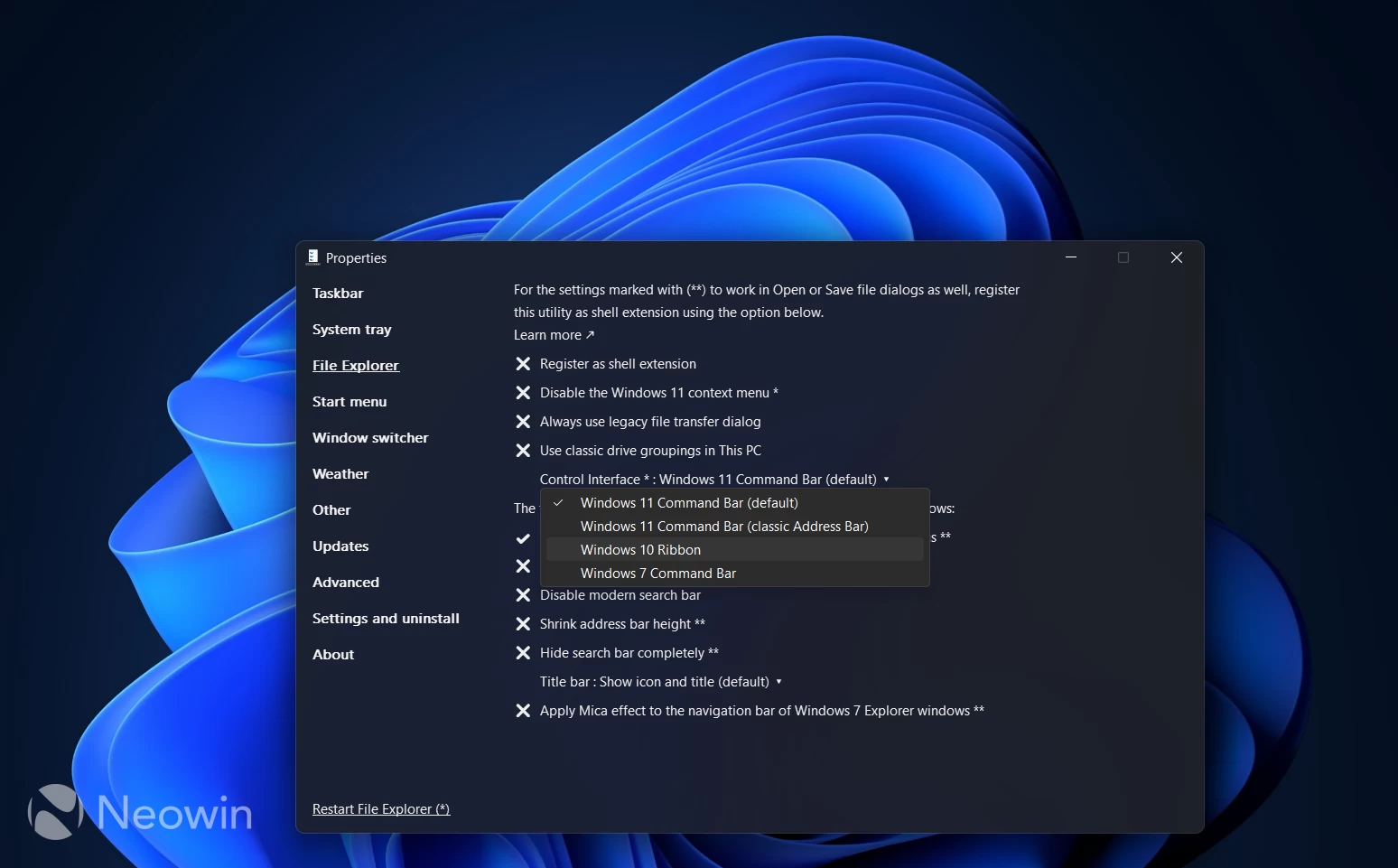
You can find the option in the ExplorerPatcher properties under the File Explorer menu. You can download ExplorerPatcher from the Neowin software stories section. Hopefully the open-sourcing of WinUI will help make things much better.